
Last updated: 20 August 2026
How to Deposit on HFM
This page explains how to deposit funds into your HFM (HF Markets) account — the minimum deposit, the funding methods, and the exact steps in the Client Area and the app. You deposit after logging in to My HFM; the exact methods and fees you see depend on your region and are shown in your Client Area.
Honest note: HFM operates via an offshore entity (FSA Seychelles) and is not Bappebti-registered in Indonesia. Only deposit what you can afford to lose — leveraged forex/CFD trading is high risk and most retail accounts lose money.
In short: the HFM minimum deposit starts from $0 (Pro from $100). You log in to My HFM, choose Deposit, pick a method available in your region, enter the amount, and confirm. Method details, currencies and what to do if funds don't arrive are below.
💳 Deposit to HFM
You deposit inside the Client Area after logging in (last checked 20 Aug 2026). Only log in on an official HFM domain.
- Minimum deposit
- From $0 (Cent/Zero/Premium); Pro from $100
- Wallet currency
- IDR / USD / EUR (set at sign-up, permanent)
- Where
- My HFM Client Area → Deposit
- Methods
- QRIS, Online Bank Transfer, Alternative, Crypto*
- Processing
- Often near-instant to a few hours, by method*
How to deposit (step by step)
- 1
Log in to your My HFM Client Area (my.hfmtrade-ind.com) or the HFM app.
- 2
Open the Deposit / Funds section.
- 3
Choose a funding method available in your region.
- 4
Enter the amount (at least the account's minimum) and confirm.
- 5
Complete the payment; funds are credited to your trading account once processed.
HFM deposit methods (Indonesia)
In the Client Area, HFM groups funding options into Bank Transfers, Alternative (e-wallets), Cryptos and All. For Indonesian clients, the available methods and their limits are:
| Method | Min | Max | Fee | Time |
|---|---|---|---|---|
| QRIS | Rp100,000 | Rp10,000,000 | No fee* | Instant |
| Online Bank Transfer | Rp100,000 | Rp50,000,000 | No fee* | Up to 10 min |
| e-Wallets (DANA, LinkAja, OVO, ShopeePay) | Rp100,000 | Rp100,000,000 | No fee* | Instant |
| Crypto Payments (A / B) | $10 / $30 | $30,000 | No fee* | Instant |
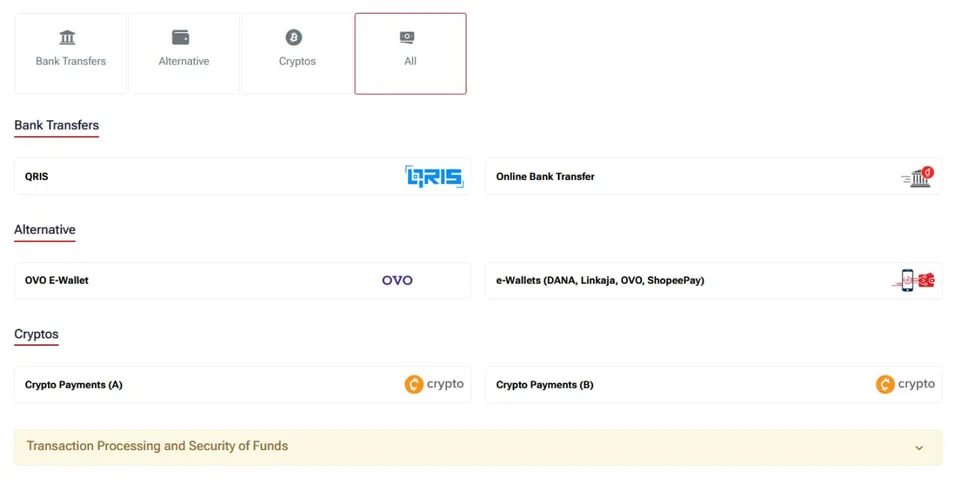
Screenshot of HFM's Client Area deposit methods, for illustration.
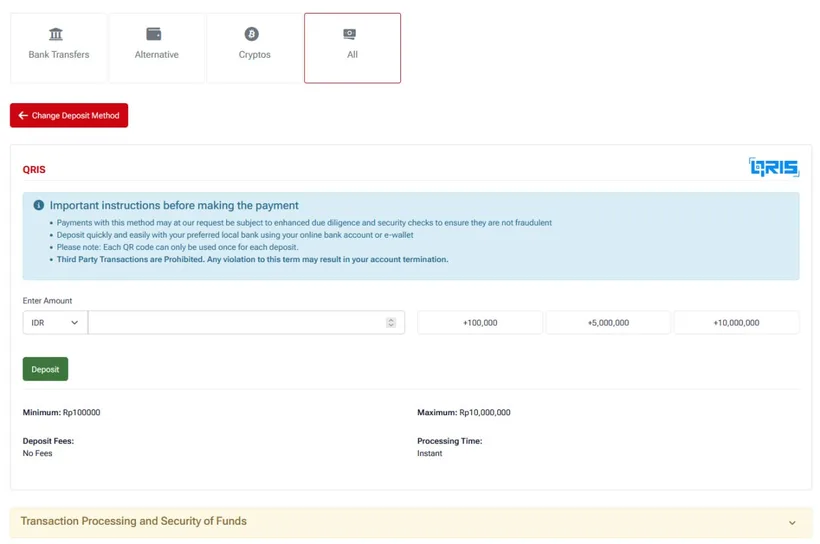
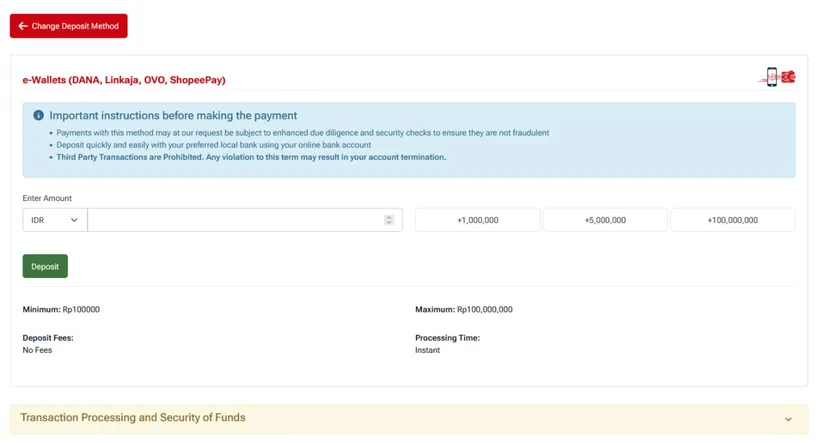
"No fee" is HFM's own charge on these methods*; your bank or payment provider may still charge one. Deposit in your own name only — HFM prohibits third-party transactions. Figures observed 20 Aug 2026; always confirm current details in the Client Area.
Minimum deposit by account
- Cent — from $0
- Zero — from $0 / €0 / Rp0
- Premium — from $0 / €0 / Rp0
- Top-Up Bonus — from $0 / €0 / Rp0
- Pro — from $100 / €100 / Rp1,600,000
Observed from HFM's Indonesia site; confirm current figures on hfm.com.* Note: the account minimum can be $0, but each payment method has its own minimum (e.g. QRIS / bank transfer from Rp100,000).
Deposit didn't arrive? Common causes
- Payment still processing — some methods take from minutes up to a few hours.
- Name mismatch — the payment account name should match your HFM account.
- Unverified account — finish KYC before depositing/withdrawing.
- Wrong wallet currency or method limits — check the details in the Client Area.
- Bank/provider decline — contact your bank, or try another supported method.
Tips for a smooth HFM deposit
- Make sure your account is verified (KYC) before depositing.
- Use a payment method in your own name so it isn't held.
- Match the payment currency to your myHF Wallet currency.
- Keep the payment receipt until the funds actually arrive.
- For block-resistant access, deposit via the HFM app.
HFM deposit & Top-Up bonus
HFM offers a Top-Up Bonus account with a flexible bonus on transfers/deposits (terms & conditions apply).* Such bonuses are usually credit with usage rules — read the terms in your Client Area before chasing a bonus, and remember a bonus does not remove trading risk. See our register guide to pick an account type.
Can't open the site to deposit? ("Internet Positif")
If the HFM website is blocked in Indonesia, use the HFM app to deposit — app access isn't affected by ISP DNS blocking. You can also try the my.hfmtrade-ind.com domain, a public DNS (1.1.1.1 / 8.8.8.8), or a VPN — always on an official HFM domain, and never enter your password on a fake page.
HFM deposit FAQ
What is the minimum deposit on HFM?
From $0 on Cent, Zero, Premium and Top-Up accounts; Pro is from $100. Always confirm current figures on hfm.com.
What deposit methods does HFM support?
For Indonesia: Bank Transfers (QRIS and Online Bank Transfer), Alternative methods, and Cryptos. The exact options appear in your Client Area when you choose Deposit.
Does HFM charge a deposit fee?
HFM generally advertises no deposit fee on its side*, but your bank or payment provider may charge one. Check current terms in the Client Area.
How long does an HFM deposit take?
It varies by method — often near-instant to a few hours. If it's slow, check the payment status and your Client Area.
Can I deposit in IDR (rupiah)?
If you set your myHF Wallet currency to IDR at sign-up, you can fund in rupiah via supported local methods. The wallet currency is fixed after your first transaction.
Why did my HFM deposit fail?
Usually a still-processing payment, a name mismatch, an unverified (KYC) account, method limits, or a bank decline. Try another supported method or contact support.
Can I deposit via the HFM app?
Yes. Open the HFM app, go to the Deposit / Funds section, choose a method, and confirm. The app is especially useful when the website is blocked.
Is there a deposit bonus on HFM?
HFM offers a Top-Up Bonus account with a flexible bonus on transfers (terms apply).* Read the terms in your Client Area; a bonus does not remove trading risk.